The Full Platform

21 Modules.
One Platform.
Zero Gaps.

Every module and feature of the LuxuryOS travel agency software, built and connected inside one system. From the first lead to the final supplier payment, nothing falls through the cracks.

4
Sales
6
Operations
4
Finance
1
Content
6
Admin and Control
Dashboard Leads and Trips Customers Campaigns Bookings Fixed Packages Readymade Library Ops Calendar Rentals Suppliers Payments Supplier Payments Invoices Reports Blog Masters Staff Bank Accounts Audit Log Roles and Access Settings Dashboard Leads and Trips Customers Campaigns Bookings Fixed Packages Readymade Library Ops Calendar Rentals Suppliers Payments
Category 01
S

Sales

Everything you need to capture leads, manage the pipeline, build customer relationships, and run marketing campaigns. This is where revenue begins.

01
๐Ÿ–ฅ๏ธ
Dashboard

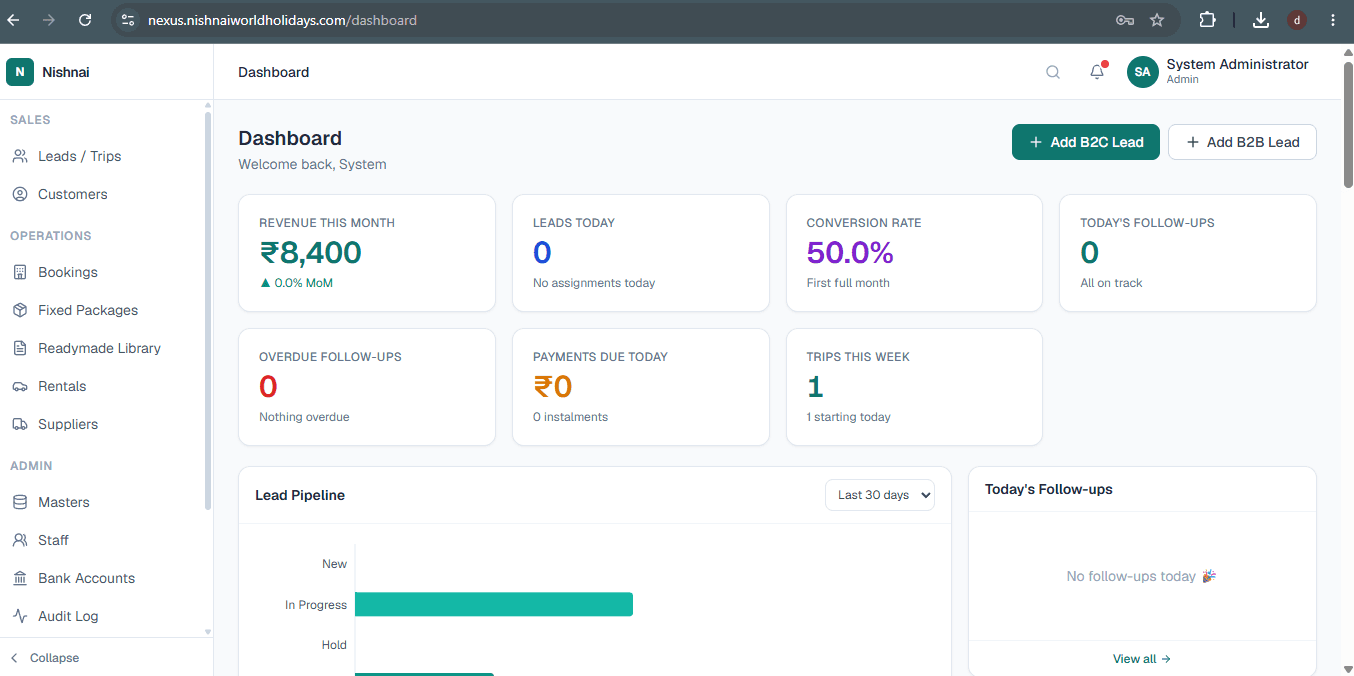
The first screen every team member sees when they log in. At a glance: Revenue This Month, Leads Today, Conversion Rate, Today's Follow-ups, Overdue Follow-ups, Payments Due Today, and Trips This Week.

The Lead Pipeline chart shows your full funnel in real time. You always know exactly where your business stands without opening a single report.

Landing Screen
LuxuryOS Dashboard showing revenue, leads, conversion rate and lead pipeline

Dashboard โ€” real-time business overview

02
๐ŸŽฏ
Leads and Trips

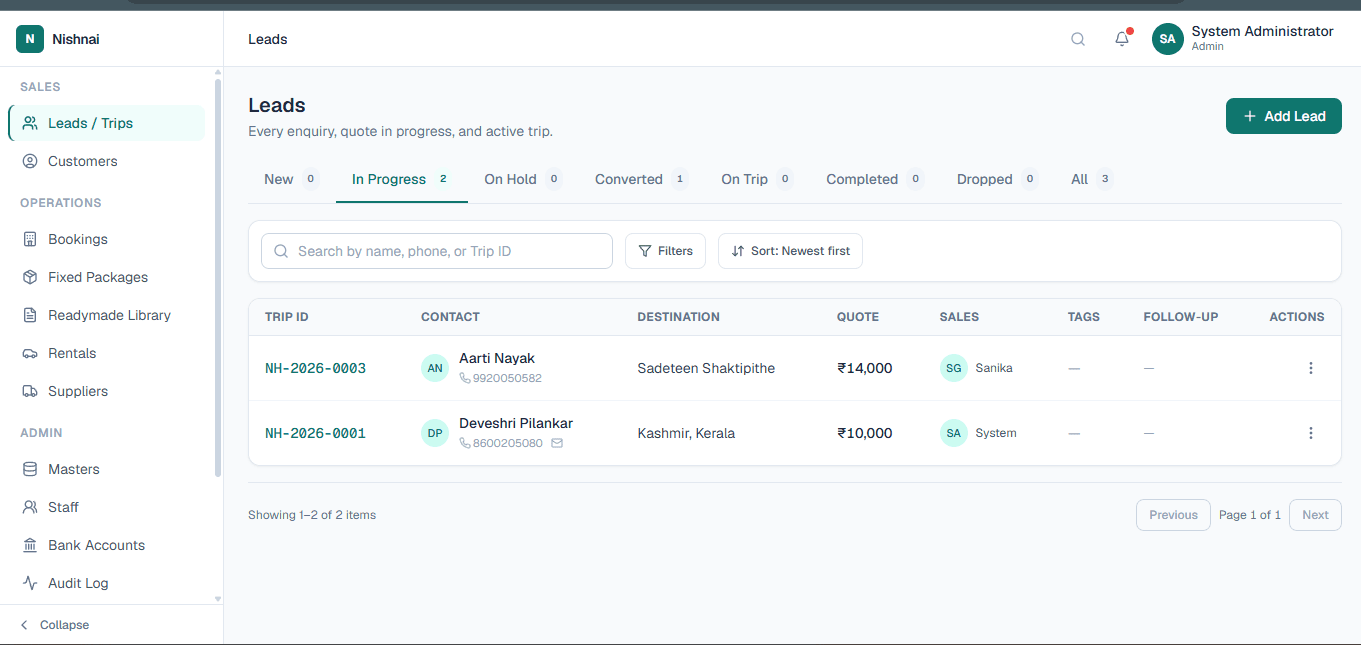
Every enquiry captured in one place. Status tabs let you move leads from New through In Progress, On Hold, Converted, On Trip, and Completed. Each lead shows the customer, destination, quote value, assigned salesperson, and follow-up date.

Adding a lead auto-checks whether the phone number is an existing customer, pre-filling their profile. Nothing gets lost, no matter which channel the enquiry came from.

Sales Pipeline
LuxuryOS Leads and Trips pipeline with status tabs and trip list
03
๐Ÿ‘ฅ
Customers

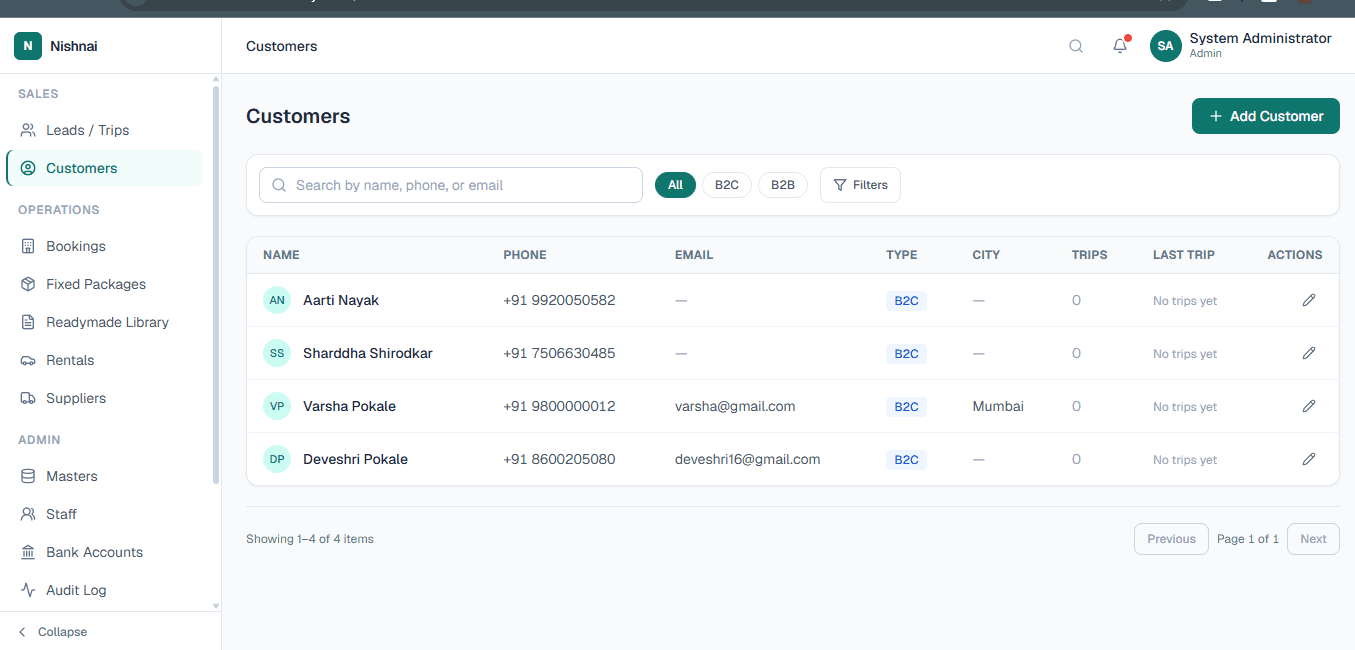
A full directory of all your B2C and B2B customers. Each row shows name, phone, email, type, city, total trips, and last trip date. Search and filter by any field.

Open any profile to see the customer's complete trip history, contact details, and preferences. Every booking they have ever made with you is one click away.

CRM
LuxuryOS Customers directory with B2C and B2B filter and customer list
04
๐Ÿ“ฃ
Campaigns

Build a recipient list directly from your customer database, select a pre-approved WhatsApp or email template, and send a bulk campaign in minutes.

Templates are saved and reusable. Campaign history is tracked so you can see who received what and when. Works through your WhatsApp Business API connection configured in Admin.

Marketing Outreach
๐Ÿ’ฌ

WhatsApp and Email Campaigns

Connected to WhatsApp Business API
Category 02
O

Operations

The engine room of your agency. Manage confirmed bookings, pre-built packages, vehicles, suppliers, and your day-to-day calendar. Keep every trip running on time and every team member in sync.

05
๐Ÿ“…
Bookings

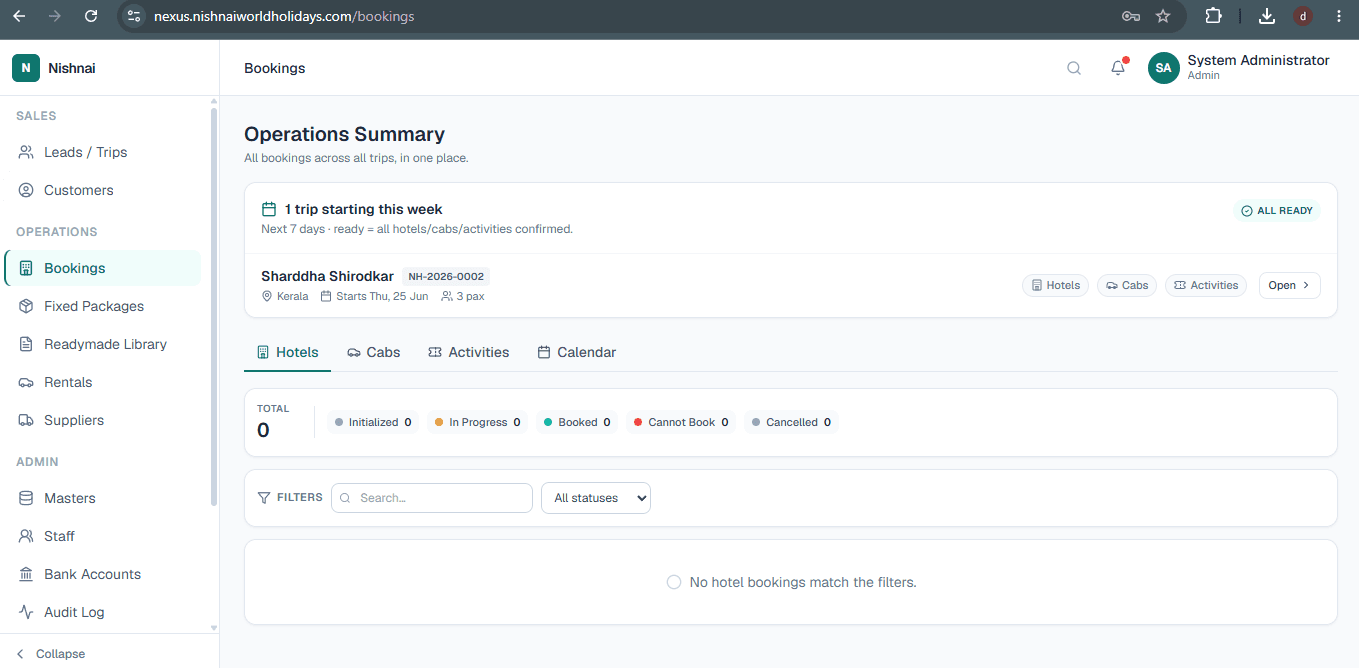
The central record for every confirmed trip. An Operations Summary at the top shows all trips departing in the next 7 days and whether hotels, cabs, and activities are confirmed.

Each booking links the customer, itinerary, hotels, transport, activities, and all payments together in one place. Tabs for Hotels, Cabs, Activities, and Calendar give your ops team a complete view without switching screens.

Confirmed Trips
LuxuryOS Bookings operations summary with trip status and hotel cab activities tabs
06
๐Ÿ“ฆ
Fixed Packages

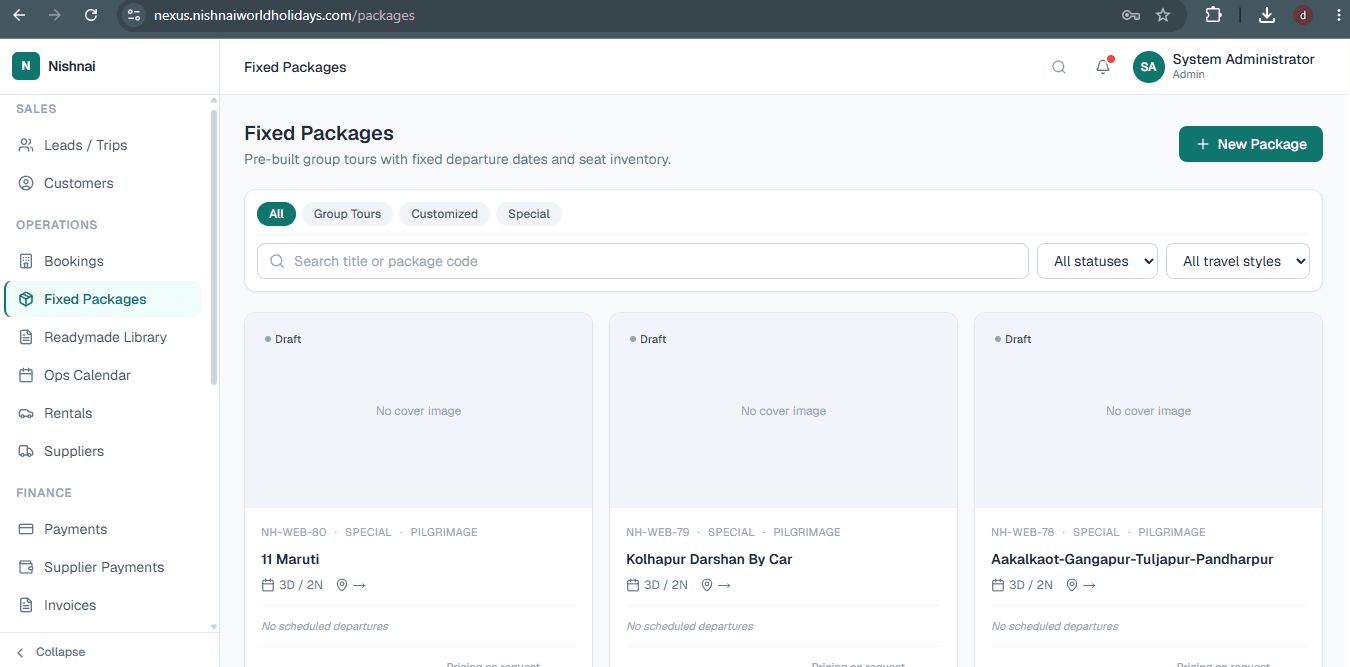
Pre-built tour packages with fixed departure dates and seat inventory โ€” Group Tours, Customised, and Special categories. Staff can sell directly from the package without building a fresh itinerary each time.

Packages can also be imported from your public website so your online catalogue stays in sync with what the team sees inside the system.

Tour Products
LuxuryOS Fixed Packages with group tour package cards and departure details
07
๐Ÿ“š
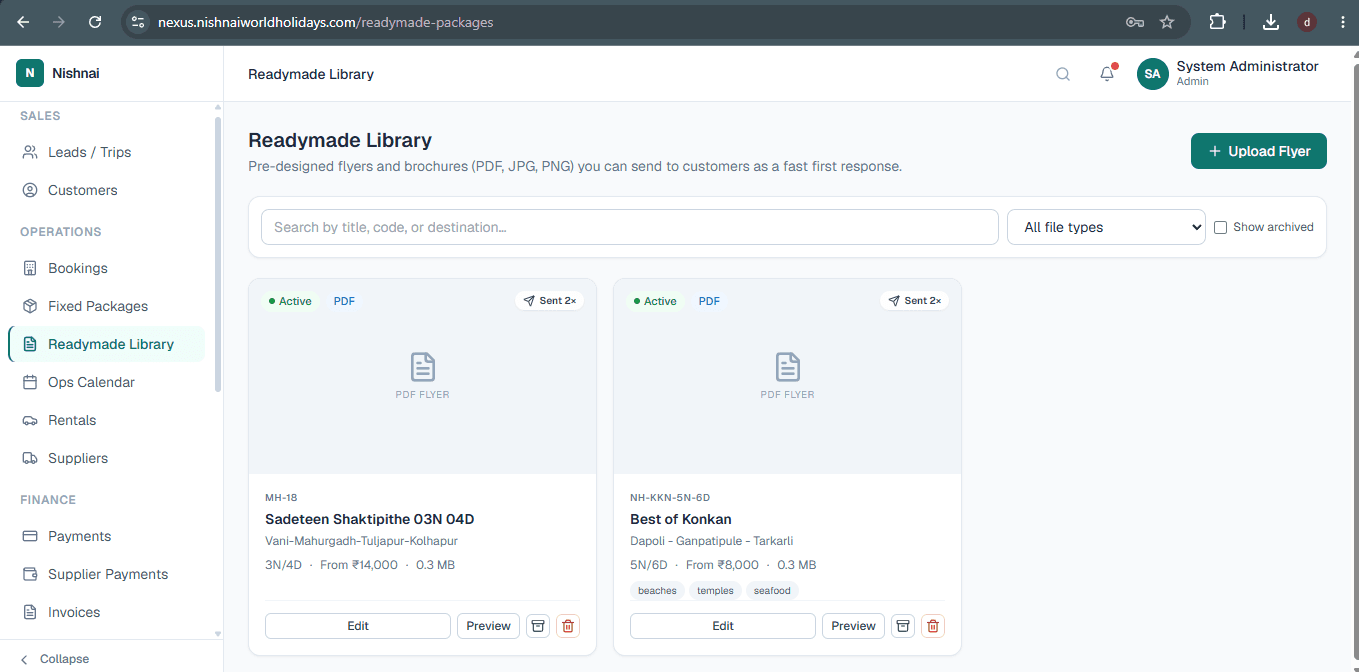
Readymade Library

A growing collection of ready-made itineraries your team builds and saves over time. When a new enquiry comes in, staff can pick an itinerary from the library, attach it to the quote, and customise as needed.

No building from scratch for common destinations. Hours saved every week on quoting.

Itinerary Templates
LuxuryOS Readymade Library with saved itinerary templates
08
๐Ÿ—“๏ธ
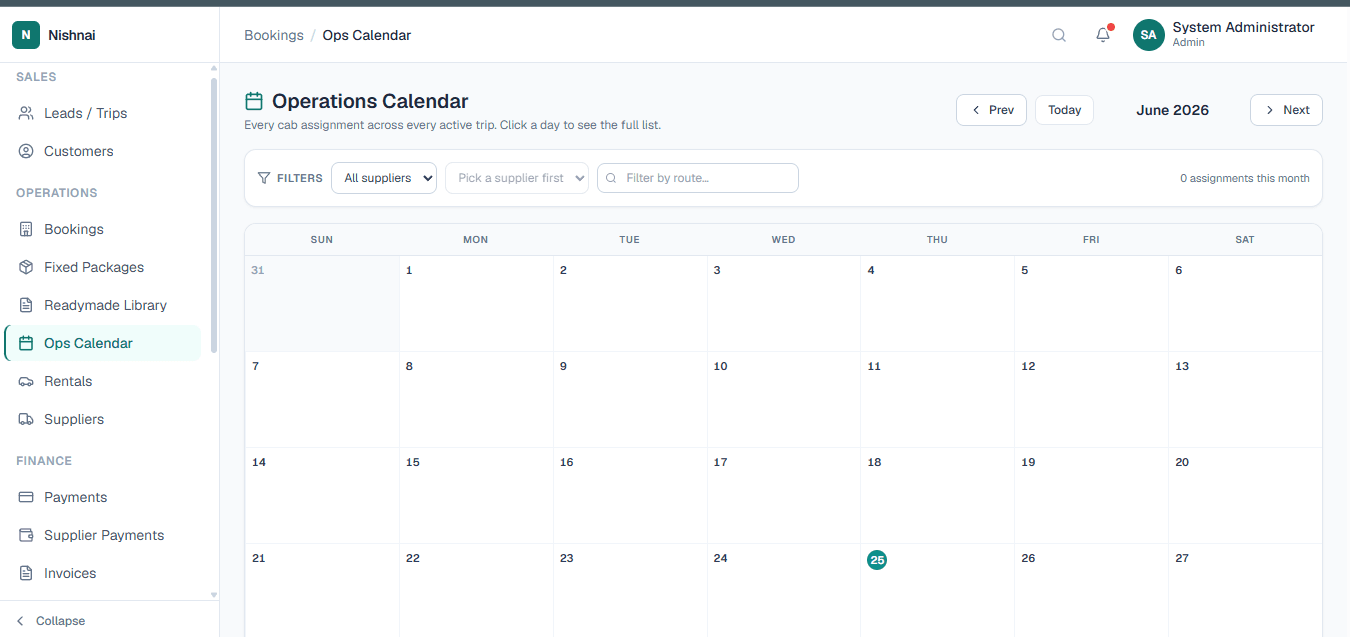
Ops Calendar

A full monthly calendar view showing every cab assignment across every active trip. Filter by supplier or route to see exactly what is happening on any given day.

Your operations team can navigate month by month, click any date to see the full assignment list, and prevent scheduling clashes before they happen.

Visual Scheduler
LuxuryOS Operations Calendar showing monthly view of cab assignments and departures
09
๐Ÿš—
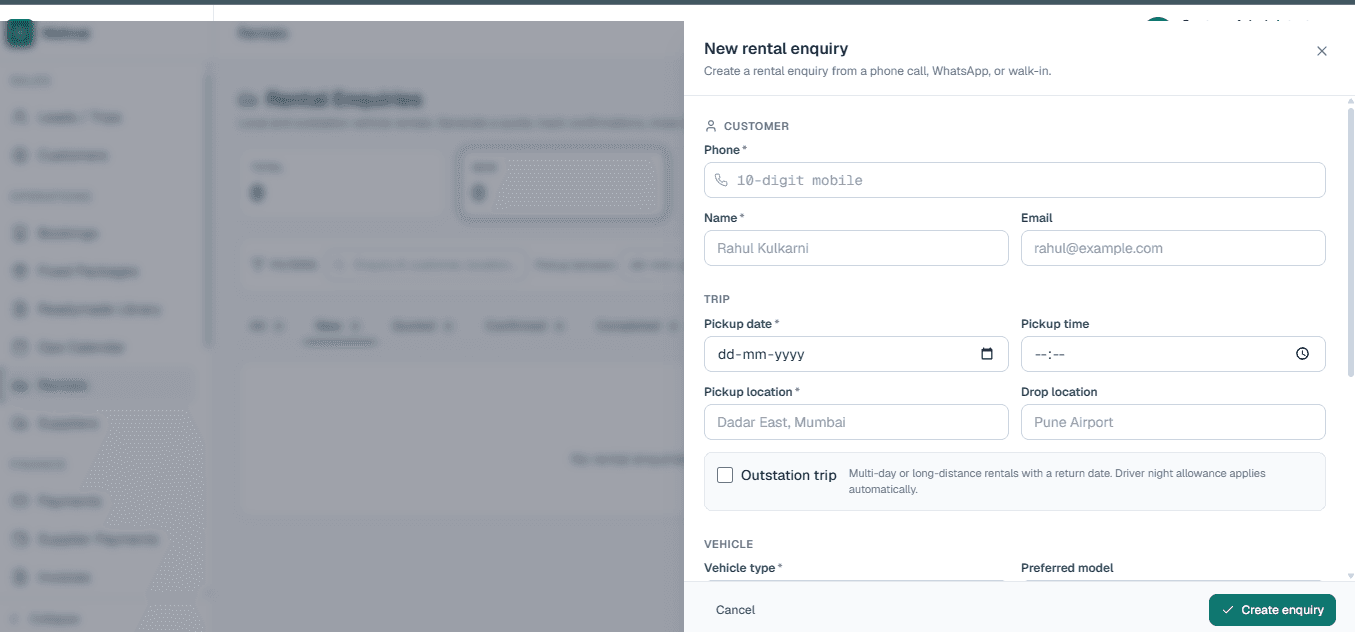
Rentals

Standalone vehicle and cab rentals booked independently of a full trip package. Airport transfers, day vehicles, and point-to-point rentals are handled here without cluttering the main bookings pipeline.

Vehicle Rentals
LuxuryOS Rentals module for standalone vehicle and cab bookings
10
๐Ÿค
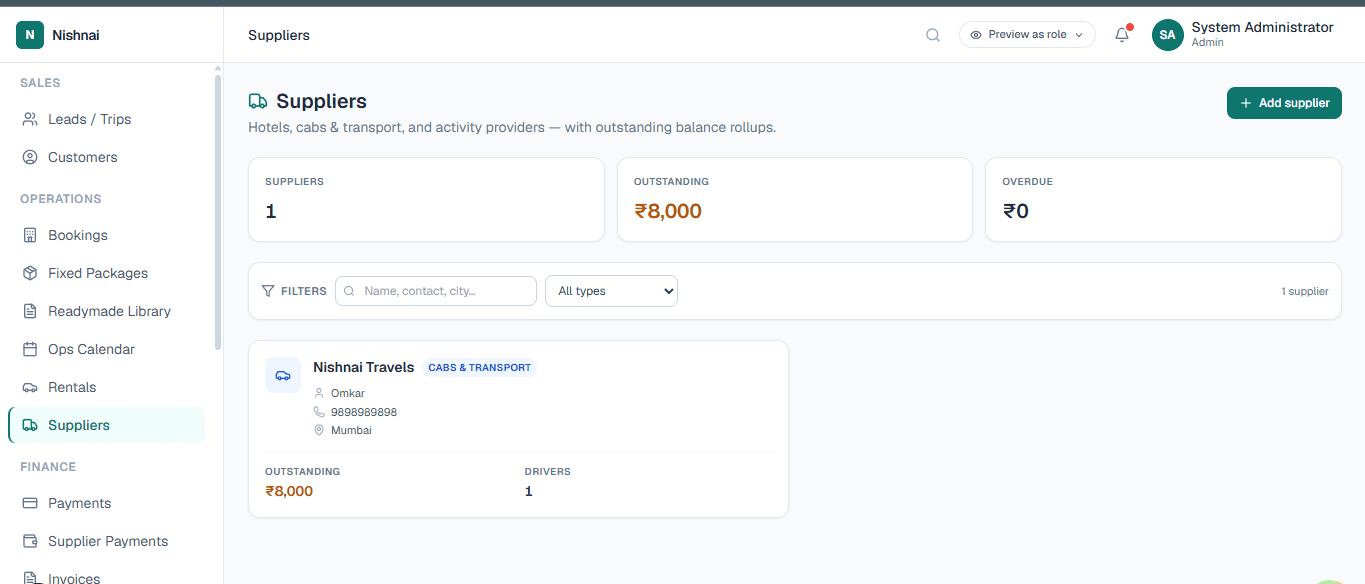
Suppliers

A complete directory of every vendor your agency works with: hotels, transport companies, activity providers, guides, and more. Each profile holds contact details, rates, and every booking they have been used for.

No more hunting through emails to find a supplier's number or last-used rate.

Vendor Directory
LuxuryOS Suppliers vendor directory with contact and booking details
Category 03
F

Finance

A complete financial layer built directly into your operations. Every rupee coming in and going out is tracked, invoiced, and reported without touching a spreadsheet.

11
๐Ÿ’ณ
Payments

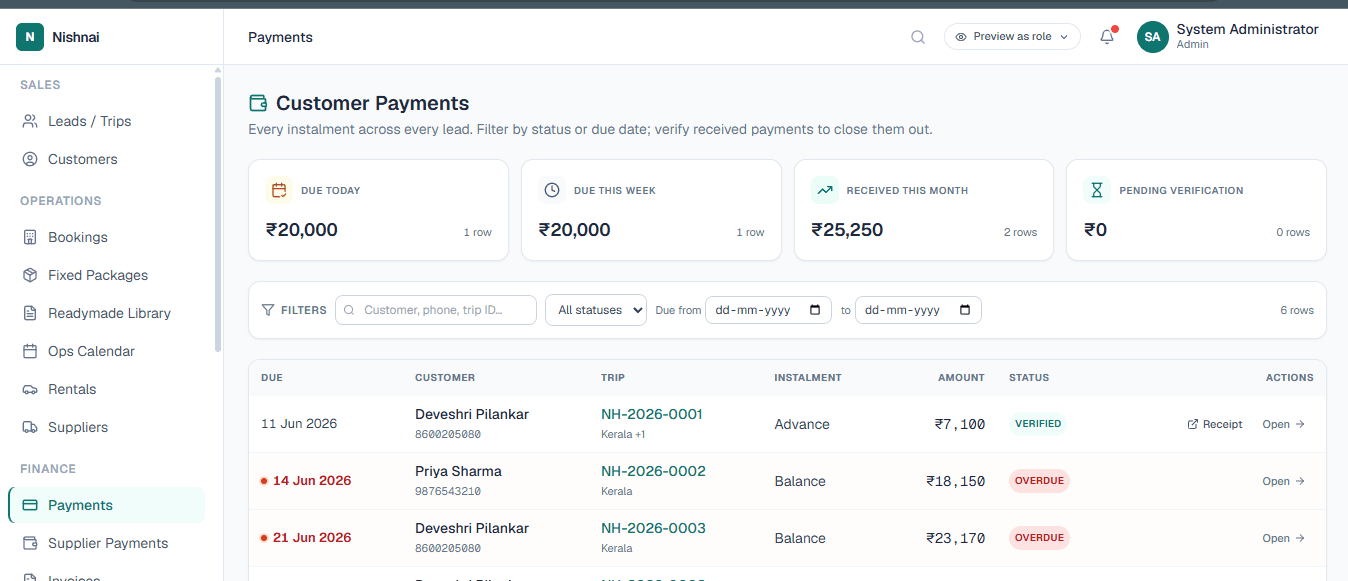
Every customer instalment across every trip in one screen. Summary tiles at the top show Due Today, Due This Week, Received This Month, and Pending Verification at a glance.

Overdue instalments are highlighted in red. Each payment row shows the customer, trip ID, instalment type (Advance or Balance), amount, and status. Online collection is handled through the Razorpay gateway with no manual reconciliation required.

Incoming Payments + Razorpay
LuxuryOS Payments module showing customer instalments with due today, this week and overdue amounts
12
๐Ÿฆ
Supplier Payments

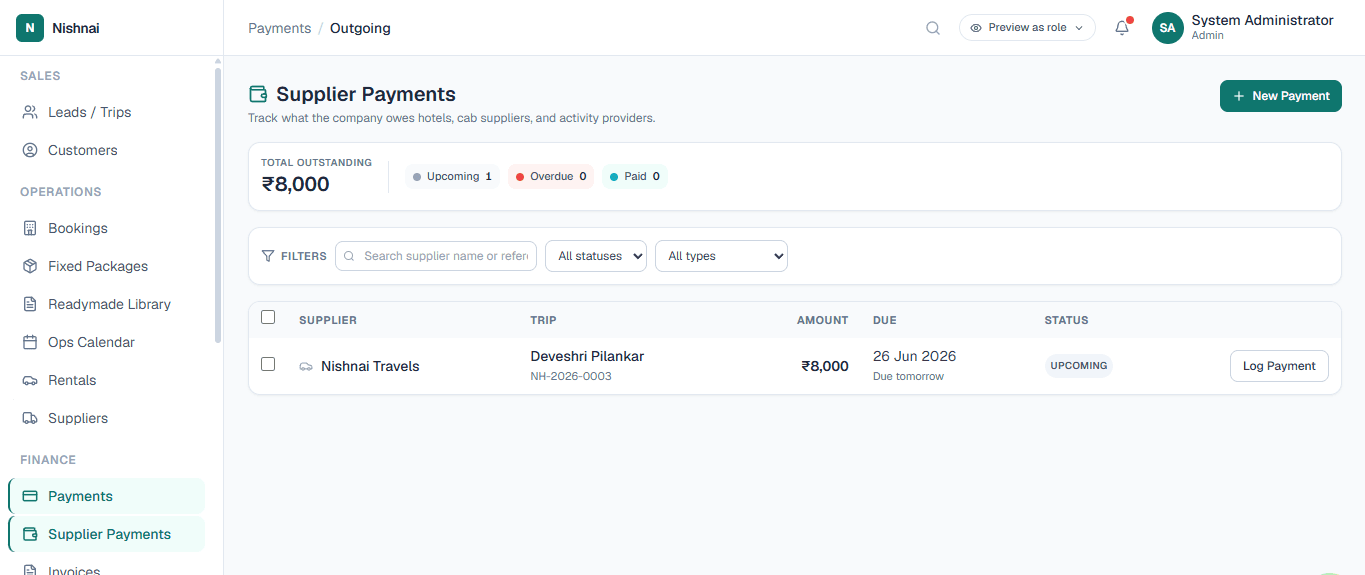
All outgoing disbursements to your suppliers and vendors. Each payment is linked to the relevant booking so you always know what has been paid, what is pending, and exactly where the money went.

Month-end reconciliation that used to take days now takes minutes.

Outgoing Disbursements
LuxuryOS Supplier Payments showing outgoing disbursements linked to bookings
13
๐Ÿงพ
Invoices

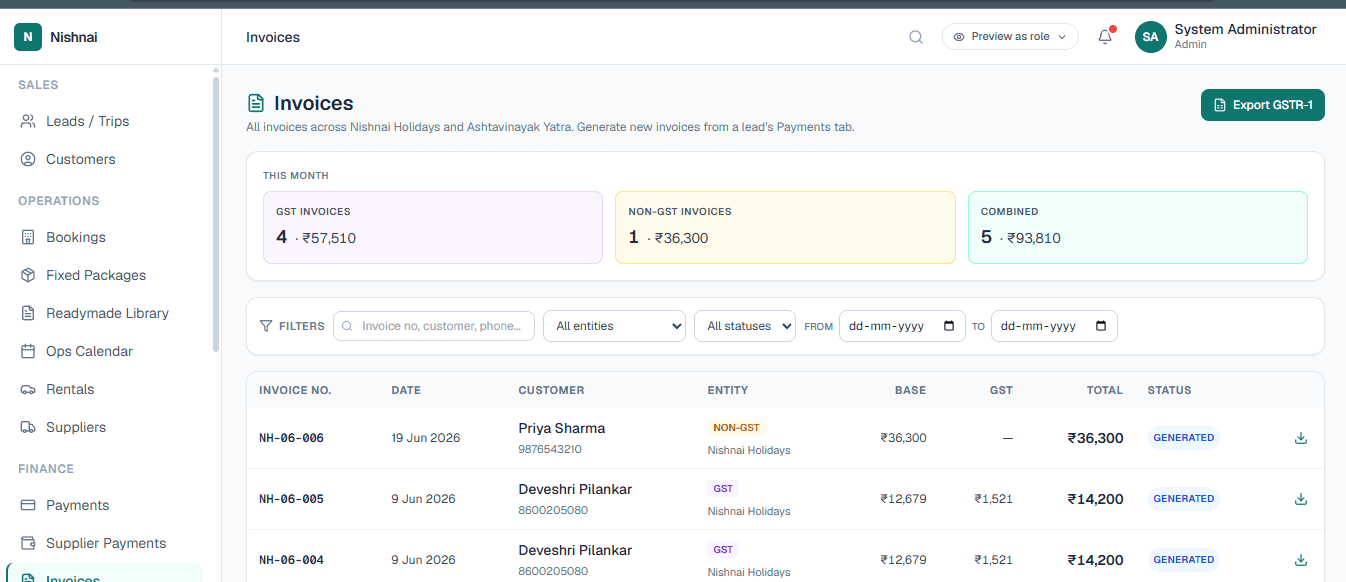
Generate GST and non-GST customer invoices as PDF documents directly from any booking. The summary at the top shows GST invoices, non-GST invoices, combined total, and GSTR-1 export is one click away.

Every invoice is stored permanently and can be resent at any time. No more building invoices manually in Word or Excel.

PDF Invoice Generator + GSTR-1
LuxuryOS Invoices showing GST and non-GST invoice list with GSTR-1 export
14
๐Ÿ“Š
Reports

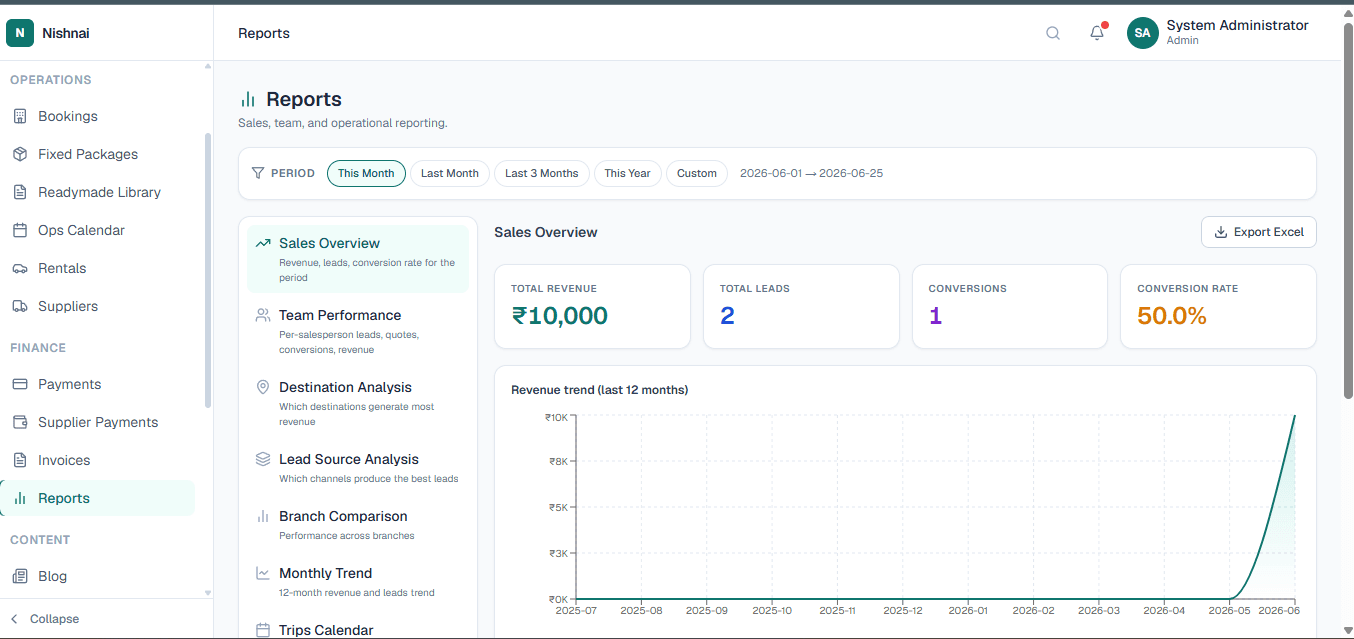
Seven built-in report types: Sales Overview, Team Performance, Destination Analysis, Lead Source Analysis, Branch Comparison, Monthly Trend, and Trips Calendar. Filter by This Month, Last Month, Last 3 Months, This Year, or any custom date range.

All data is live and pulls directly from your bookings and payments. Export to Excel with one click. No more assembling numbers from five different tools at month-end.

Business Intelligence
LuxuryOS Reports with sales overview, team performance, destination analysis and revenue trend chart
Category 04
C

Content

Publish travel content directly from inside LuxuryOS to build your online presence and attract new clients through search engines.

15
โœ๏ธ
Blog

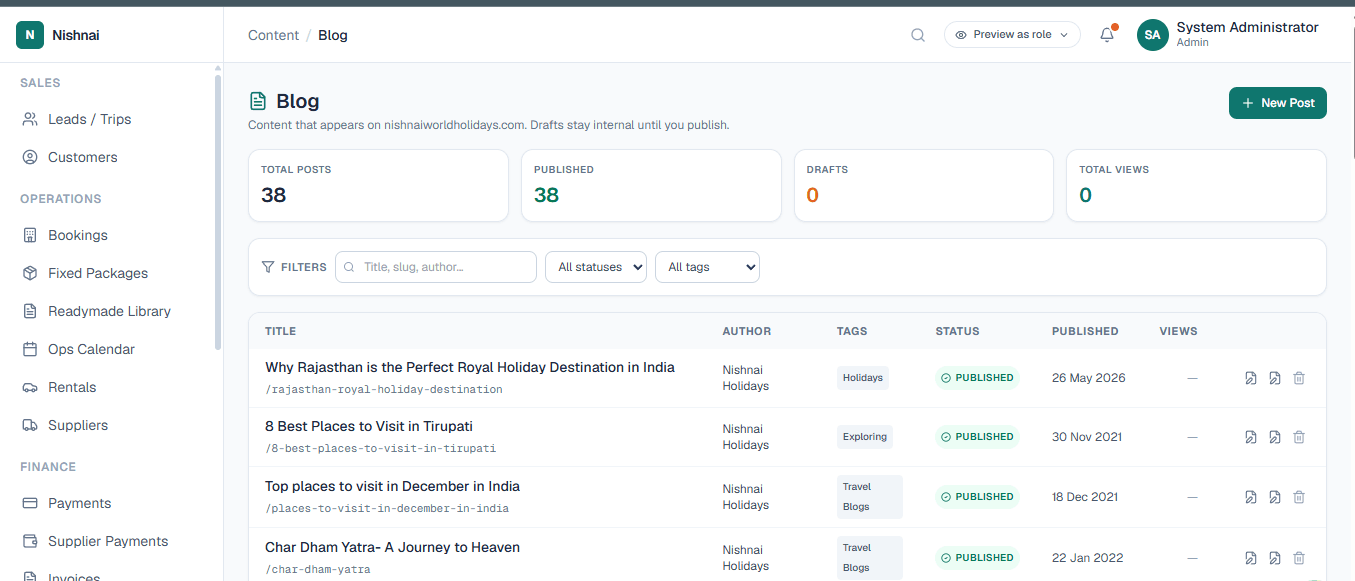
A built-in CMS to write and publish blog posts directly from LuxuryOS using a rich-text editor. Published posts appear on your company website and help you rank on Google without needing a separate CMS tool.

What you can publish

+Destination guides and travel tips
+Sample itineraries to attract leads
+Package highlights and seasonal offers
+Client stories and travel experiences
+SEO-optimised long-form content
Content CMS
LuxuryOS Blog CMS with rich text editor for publishing destination guides and travel content
Category 05
A

Admin

The control layer that governs how the entire platform works. Configure users, permissions, reference data, integrations, and system settings from one central place.

16
โš™๏ธ
Masters

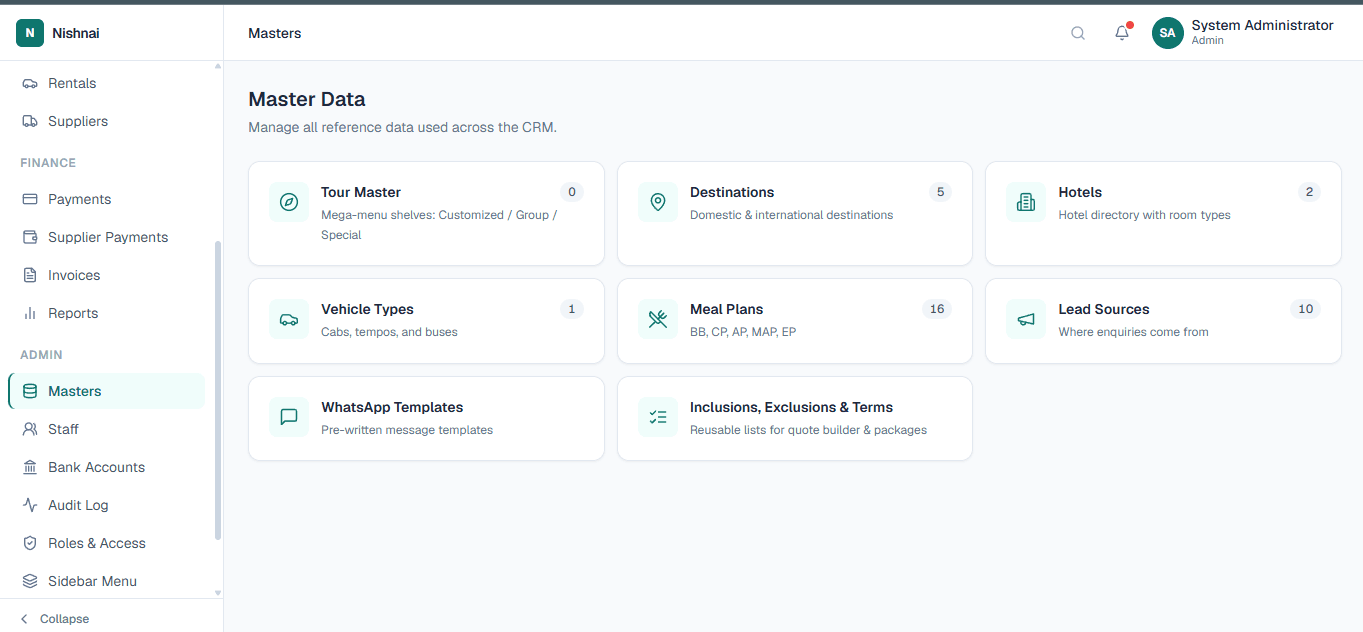
The central reference data library that powers the entire platform. Configure: Tour Master, Destinations, Hotels, Vehicle Types, Meal Plans, Lead Sources, WhatsApp Templates, and Inclusions, Exclusions and Terms.

When you add a hotel here, it is instantly available across bookings, packages, and itineraries. Set it once; use it everywhere.

Reference Data
LuxuryOS Masters showing Tour Master, Destinations, Hotels, Vehicle Types, Meal Plans and Lead Sources
17
๐Ÿ‘ค
Staff

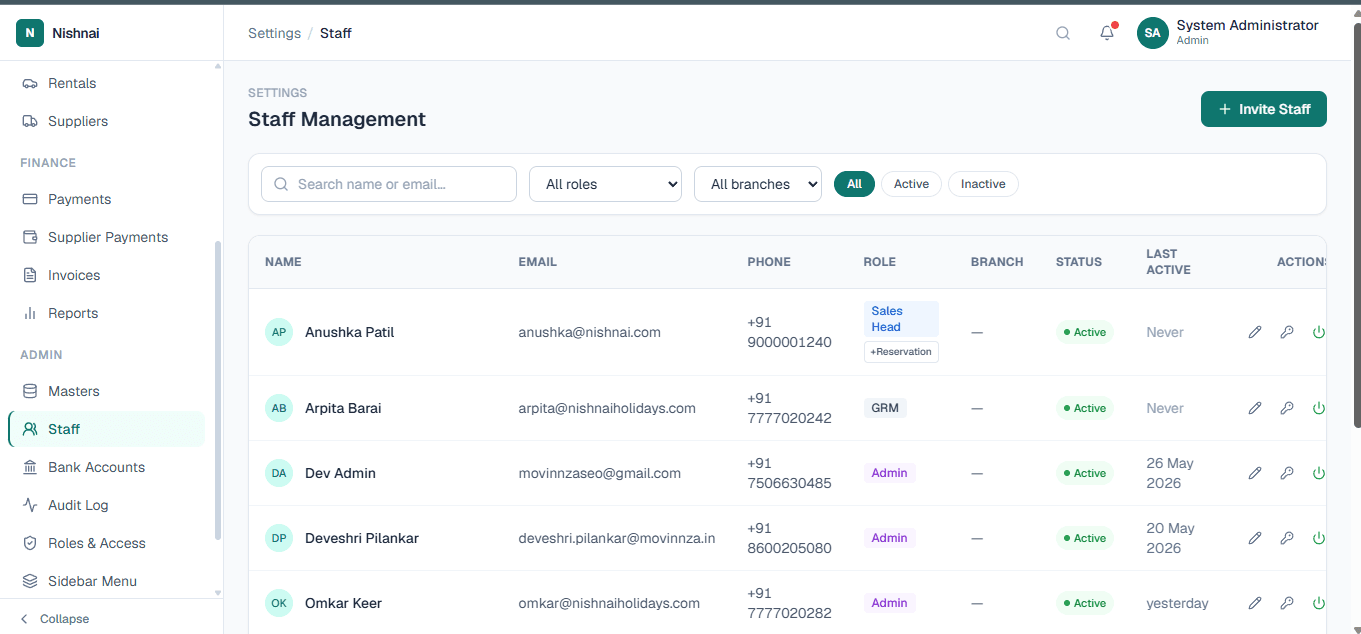
Manage all internal user accounts. Create staff members, assign them roles, and control exactly which modules and actions they can access. A sales agent sees the pipeline; a finance user sees payments; admins see everything.

User Management
LuxuryOS Staff user management with role assignment and access control
18
๐Ÿง
Bank Accounts

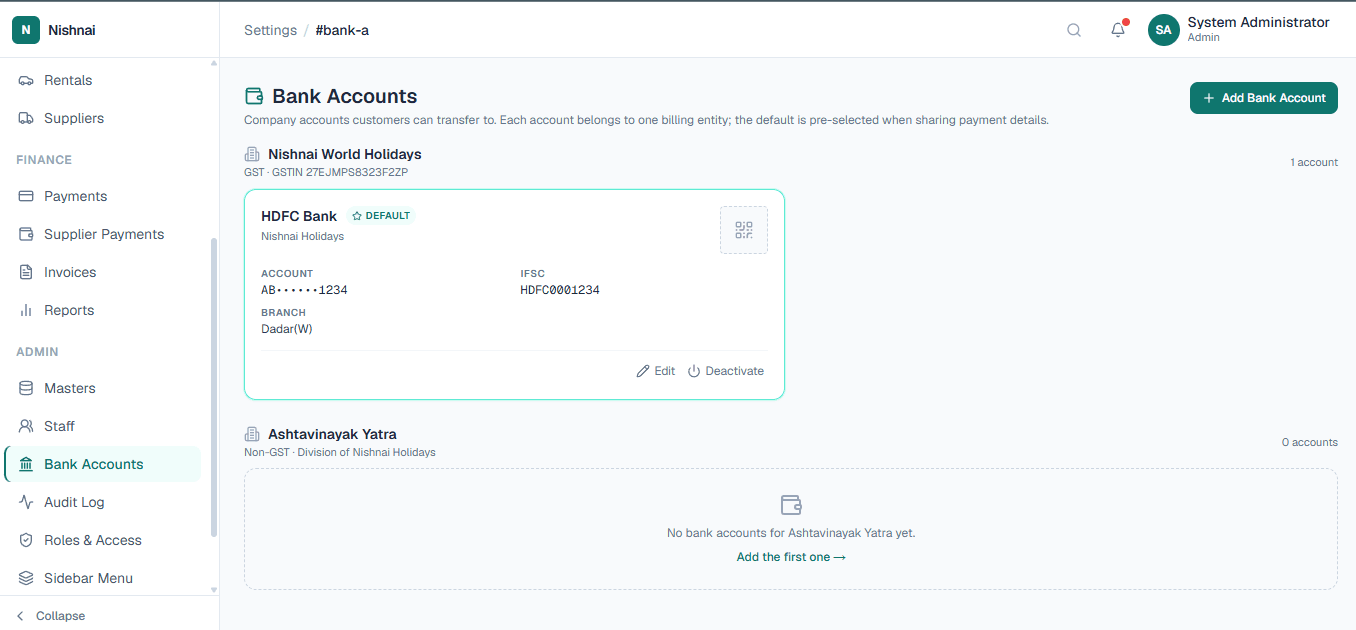
Configure all bank accounts your organisation uses for receiving customer payments. These accounts appear on invoices so clients know exactly where to transfer funds. Supports multiple accounts for different branches or billing entities.

Payment Configuration
LuxuryOS Bank Accounts configuration for customer payment collection and invoicing
19
๐Ÿ’ฌ
WhatsApp

Configure your WhatsApp Business API connection: add credentials, create and manage approved message templates, and handle opt-out requests. Once set up, bulk campaigns from the Campaigns module flow through this connection automatically.
Messaging Configuration
๐Ÿ“ฒ

WhatsApp Business API
Template and opt-out management

20
๐Ÿ”
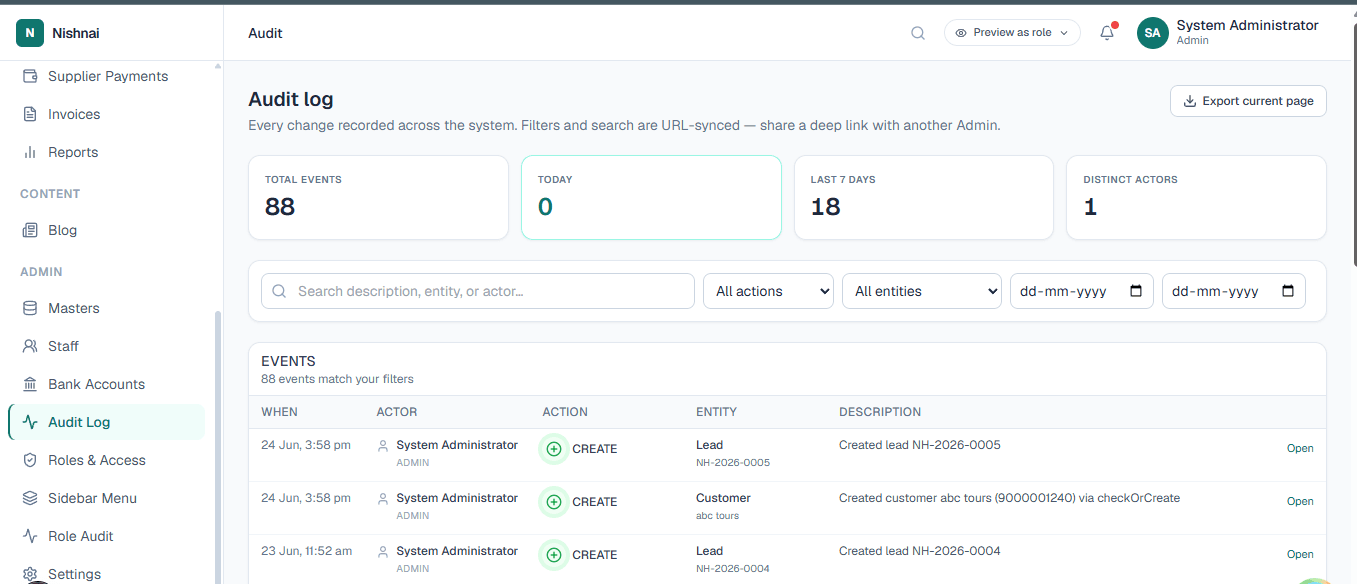
Audit Log

A complete, immutable record of who did what and when across the entire system. Every create, update, and delete action is logged with the user, timestamp, and what changed. If something looks wrong, the Audit Log tells you exactly what happened and who made the change.

Compliance and Accountability
LuxuryOS Audit Log showing immutable record of user actions with timestamps
21
๐Ÿ›ก๏ธ
Roles and Access

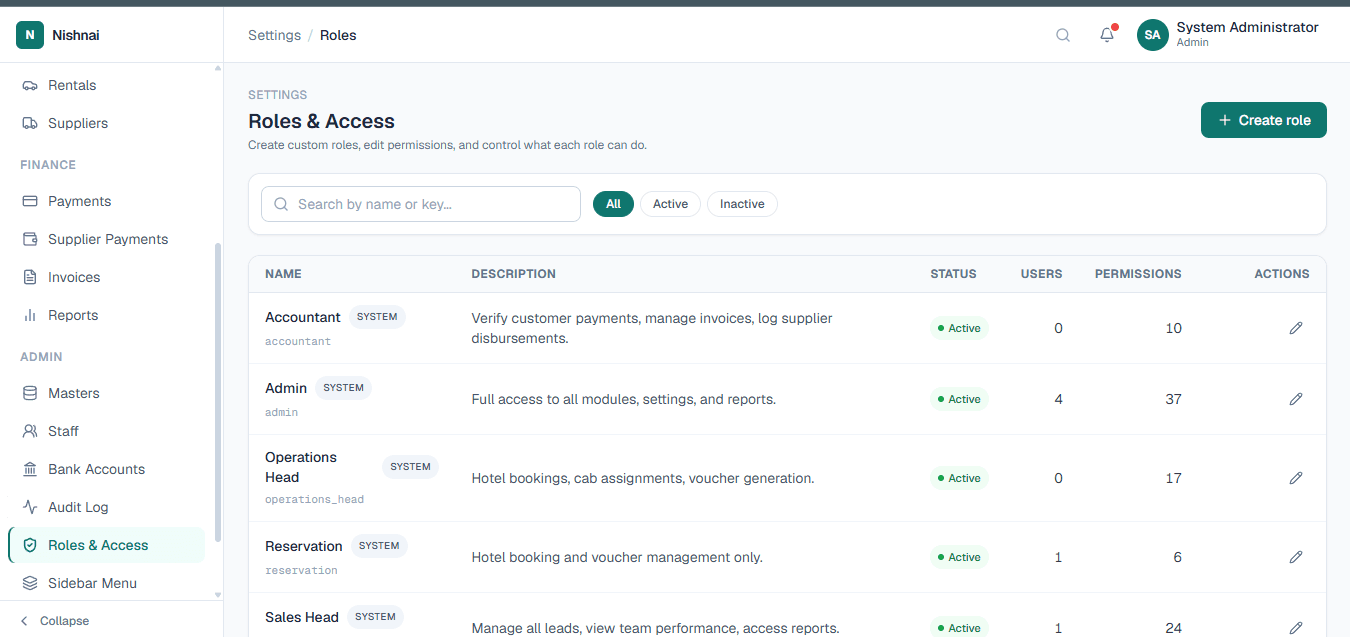
Define staff roles and the exact permissions attached to each: which modules, pages, and actions every user can see and perform across the platform. Role-based access control keeps your data secure and your team focused on what they need.

RBAC
LuxuryOS Roles and Access control defining permissions for each staff role
See It All in Action

All 21 modules.
Ready for your team today.

Request a private Enterprise Sandbox and get full access to every module on this page. Your team can explore the platform with real data before making any commitment.

Request an Enterprise Sandbox
Get in touch